


Automatisation bu boole IA : agents, jaay-jënd, processus, document yi ak robotique ci projet pilote
Outil bi dafa defar. Seen équipe yi ñoo tànn.TeamElGhazi boole IA ci liggéeyu organisasion yi, ci 5 domaine : IA agentique (agents IA), IA commerciale, automatisation processus liggéey, IA ci seen document ak seen données, IA physique ak robotique ci projet pilote. IA di jàng, di classer, di defar; benn nit mooy jàpp li am solo. Diagnostic, proposition bind, ba mu tàmbalee ci yoon yi, ci internet walla ci kanam ci Maroc.
 4,8ci 5 · 11 avis Google
- 11service yi automatisation ci catalogue
- 23modèl yi automatisation
- 100làkk yu liggéey
5 domaine
automatisation.
 01IA agentique: ajan IA yu jëfandikoo ab laaj ba mujjAjan bi di defar liggéey bi. Dogal bi, seen bopp ngeen koy jël.→
 02IA commercialeAb contact bu nu topp, ab tontu bu nu jàng, ab relance bu nu programme.→
 03Automatisation processus yu liggéeyLi sa ekip di bind bis ci bës bu nekk, système bi mën na ko def.→
 04IA ci seen dokumaa yi ak seen données yi: tontu yu wone seen sourceYónnee seen laaj. IA di tontu, te di wone page bi tontu bi jóge.→
 05IA physique ak robotiqueBenn cas bu tollu, benn prototype, mesure ci terrain, ba noppi décision bi.→
Benn laaj agsi.
Mu génn, ñu ko jëwal.
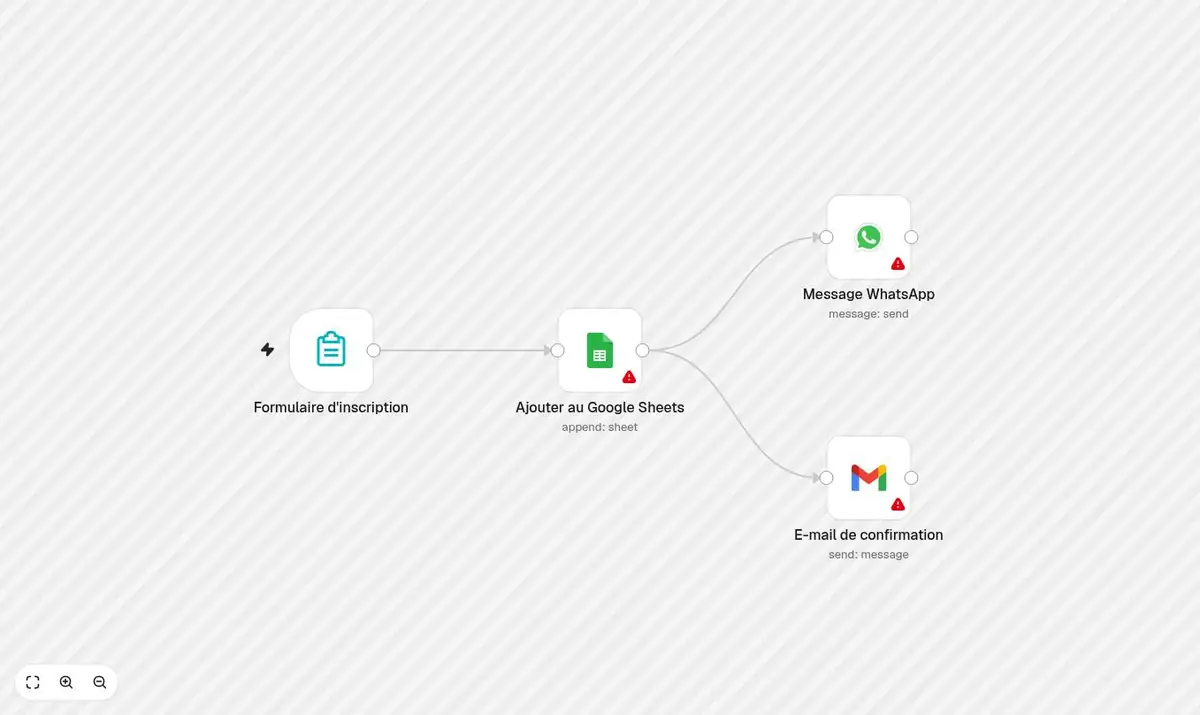
- 01Benn laaj ñëwCi WhatsApp, ci e-mail walla ci benn formulaire, ci waxtu bu nekk.
- 02IA di jàng te di jëwalMu xam kan mooy bind ak li mu soxla, def laaj bi ci rang, te jëwal tontu bi walla dokumaa bi.
- 03Benn nit di dëggalBu kàttan bi am solo, benn ku ci seen équipe di jàng ko, di dëggal ko ci benn yëg.
- 04Yónnee na, bind naTontu bi dem, dosye bi di yeesu: dara du weddi.
Du processus observé au système en service
- 01Le diagnosticLe processus, vos outils, vos volumes, et ce qui doit rester humain.
- 02La proposition écriteCe qui sera automatisé, ce que l'IA prépare, qui valide, le prix.
- 03Construit sur vos vrais messagesTesté sur vos e-mails, vos messages et vos fichiers réels avant toute mise en service.
- 04Chaque envoi validé, au débutPuis vous relâchez la validation, étape par étape, quand vous êtes en confiance.
- 05Journal, alerte, prise en mainChaque action est inscrite, une alerte part en cas d'erreur, vos équipes reçoivent la documentation.
Li nu
automatise.
 01
Relanse ak rappel otomatik yi: devis, fey ak rendez-vous
Devis bi dem na. Ana ci kanam?
- Ñi ko jëfandikoo
- Entrepriz yi, institusiyon yi, etablisman yi, ñi liggéeyal ci seen bopp
- Proseseus yi ñu topp
- Relanse devis, rappel fey ak rendez-vous, suivi
- Kanal yi ñu boole
- WhatsApp ak e-mail
 02
Chatbot ak assistant IA
Assistant bu baax xam na tontu. Assistant bu baax lool xam na it kañ ngay noppi.
- Ngir ñan
- Entreprise, groupe, institution, établissement, ñi ci seen bopp
- Canal yi ñu boole
- Site web, WhatsApp, e-mail, jumtukaay yu biir
- Làkk yi
- Yi say kiliyaan di wax, ñu leen seet ci say bataaxal yu dëgg
- 03
Scripts Python bu ñu defal: sa liggéey yu automatisé
Bu outil standard amul dara, benn program bu ñu bind ngir yow la ko def.
- Ngir kan
- Entreprises yi, groupes yi, institutions yi, établissements yi
- Liggéeyi nu topp
- Dosiers yu ñu jàng, documents yu ñu sos, kontrol, yónnéen, surveillance
- Fiche teknik
- Python
 04
Automatisation devis, factures ak comptabilité
Devis bu yónnee ci ñaareel bi, mooy devis bu ñu yónnee ginnaaw bu concurrent bi.
- Ngir kan
- Entreprises, groupes, institutions, établissements
- Processus yi ñu topp
- Devis, factures, relances ci paiement, export bu weer ci comptable bi
- Jaxasoo ci
- Sa logiciel facturation walla gestion bi, CRM, messagerie, e-mail
 05
Inscriptions ak admissions
Laaj bi ñëw na ci 23 h. Ca subaa si, dosye bi rangé na léegi.
- Ku ko jëfandikoo
- Lekkoli, lekkoli yu bokk, centres ak organismes yu jàngale
- Yoon yi lañu topp
- Formulaire, dosye, accusé, pièces yi ñu soxla, confirmation
- Ñu bokkal ko ak
- Sa site, sa système ngir topp inscrits yi, e-mail, WhatsApp
 06
Tablo yi
Su xam-xam bi ñëw benn semaine ci kaw, du xam-xam moo tax, dafa doon xam-xam bu weesu.
- Ngir kan
- Entreprises, groupes, institutions, établissements ak ñi jàpp ci boppam
- Liggéey yi ñu topp
- Jël, boole, synthèse yi, rapport yi, alerte yi
- Gis yi
- Synthèse ci messagerie walla e-mail, PDF, Looker Studio, Power BI
 07
Diagnostic bu automatisation: lan ñu automatisé jëkk
Automatiser tâche bu wér, mooy fey xaalis ngir dem gaaw ci yoon bu wér.
- Waxtu
- Ñu fixe ko ci proposition bi, ci gëm bu liggéey bi
- Format
- Waxtaan ci distance
- Ngir kan
- Entreprises, groupes, institutions, établissements
- 08
Intégration CRM ak ERP
Benn CRM bu ñu bindee ci loxo, dina mujj a wax lu dul dëgg.
- Ngir kan
- Entreprises yi, groupes yi, institutions yi, établissements yi
- Logiciel yi
- Odoo, HubSpot, Salesforce, walla benn logiciel bu am API walla exports
- Gouvernance
- Identifiant bu bokk, journal bu bind bu nekk, ak liaisons yi ñu gëstu
- 09
Automatisation e-commerce: commande, stock ak livraison
Jaay bi di am ci benn minit. Lépp lu ko topp dafay jël benn waxtu.
- Ngir ñan
- Enseigne, marque, distributeur, groupe, jaaykat yu ci seen bopp
- Liggéey yi ñu ame
- Confirmation, stock, expédition, fay, delloo, synthèse bu ngoon
- Gouvernance
- Annulation yu say équipe nangu, journal ak alerte stock
- 10
Agent vocal IA
Telefon bi di woote ci biir consultation bi. Benn nit war na tontu ko.
- Ku la jëfandikoo
- Cabinet yi, klinik yi, service accueil yi, établissement yi
- Yëf yi lañu jàpp
- Tàggu ci telefon, laaj yu bare, rendez-vous, yóbbu woote bi
- Bokk ak
- Sa telefoni, sa agenda, sa messagerie
- 11
Supervision ak maintenance ci sa automatisations yi
Automatisation du taxaw bis bi ngeen ko seetloo.
- Ñi ko war
- Entreprises, groupes, institutions, établissements
- Lu nu supervisé
- Automatisations, ajent IA yi, scripts, intégrations, serveurs
- Alerte
- Léegi léegi walla résumé bu bés bu nekk, ci WhatsApp walla ci e-mail
Modèl yu
pare ngir sol.
- 01
Préinscriptions d'école
Waajur bi di joxe formulaire bi ci 21 h. Dossier bi am na numéro ci 21 h.
- Njariñ
- Benn fiche ci préinscription bu nekk, di ko topp ba décision bi
- Li di lanceel
- Yónnee formulaire bi ci internet
- Outils
- Formulaire ci internet, n8n, Google Sheets
- 02
Absence yi xamal
Dul dem bi ñu jàppee ci 8 h 40. Waa kër bi xam ko ba ngoon bi tàmbalee.
- Njariñ
- Waa kër xamal ci bu tey, absence yu bari ñu xamal
- Lu ko yég
- Benn waxtu bu fixe ci bës bu jàng bu nekk
- Jumtukaay yi
- Google Sheets, n8n, API WhatsApp Business walla e-mail
- 03
Sàkk attestations jàngale yi ci PDF
Session bi jeex ci 17 h. Attestation yi dinañu yónnee ci 17 h 05.
- Njariñ
- Benn attestation PDF numérotée ci kenn-kenn participant
- Tàmbali
- Jeexal session bi ci tableau bi
- Ay jumtukaay
- Google Sheets walla sa logiciel, n8n, gabarit, rendu PDF, e-mail
- 04
Xibaar rendez-vous
Benn xibaar dafay ñëw bëccëg. Fotey bi du toog ku amul.
- Jafe
- Rendez-vous yu fàtte ak xibaar yu ñu yónnee ci loxo
- Lansu bi
- Ñu jàng Google Agenda ci waxtu bu fixe
- Njariñ
- Benn xibaar WhatsApp njëkk benn-benn rendez-vous, waaye benn yoon rekk
- 05
Devis automatique ci saa si ñu laaj, yónnee ci WhatsApp
Ñetti tontu ci WhatsApp. Devis PDF agsi ci benn minit.
- Li ñu jot
- Devis bu dëggal, numéroté, yónnee saa sa, ak suivi bi
- Li tàmbali
- Laaj walla réservation bu dëggal
- Ndaw yi
- Page laaj, Python walla n8n, rendu PDF, WhatsApp, suivi walla CRM
- 06
Rendez-vous ci online
Bàyyi « ndax talaata, dangay set? ». Ku ñu jàng tànnee, agenda bi di fees.
- Jafe
- Ay xibaar ngir fixer rendez-vous bu nekk
- Lu ci jàppe
- Ku ngi gis sayt bi tànn benn waxtu bu amul
- Njariñ
- Benn waxtu bloque, ñu numérote ko, ñu confirmé ko ci WhatsApp
Jëf yi
ci pàcc bi.
- 08Nowplanning.teamelghazi.comJël bu mat, ci tànnaay waxtu bi ba ci jot devis bi, te amul nit ki war a dox ci.Automatisation bu boole IA→
- Sunu automatisation: sisteem yi di dox TeamElGhaziProspection ak suivi ci e-mail, LinkedIn ak WhatsApp, réservation, publication, synthèse bu suba, supervision: sunu sisteem sunu bopp, di liggéey bés bu nekk.Automatisation bu boole IA→
- 16OktAssistante IA bu ab jàmbaar ci wàllu njàngMessagerie, e-mail ak agenda ñu bokk ; dafa doon nangu tontu bu nekk balaa yónnee.Automatisation bu boole IA→
Logiciel, njëg, moom seen bopp:
seen xalaat yu tële ñu tontu.
5 tontu
Lan la « automatisation bu boole IA » di wax ?
Seen outil yi lañu lëkk ci kaw, IA di jëfe fu ñu ko jàppale : jàng laaj bi, teg ko ci kaw benn, defar tontu walla document. Li des topp ci yoon yu fixe, benn nit moo jàpp li am solo.
Ndax war nañu soppi seen logiciel yi ?
Déedéet, ci mbirum ñu bare. Dinañ lëkk ci li ngeen jëfandikoo jau ; diagnostic bi di wax su outil benn am solo.
Ban njaay la projet bi jaar ?
Njaay bi dafa wara ci processus bi, ci limu sistem yi ñu war lëkk, ak ci kaaraange validation bi ngeen soxla. Ñu fixe ko ci proposition bu bind, ba mu tàmbalee diagnostic bi.
Ndax seen équipe yi mën nañu jàng ci def ko seen bopp ?
Waaw. Projet bu nekk mu jeex ak jàngale ngir jëfandikoo ko, te sunu formations IA ak automatisation dinañ dimbali seen équipe yi ngir ñu def seen bopp automatisations.
Ndax indépendant mën na woo yeen ?
Waaw, ngir benn processus bu tollu : rendez-vous, devis, relances. Yoon wi mel ni : benn waxtaan, ba ci des benn proposition bu bind.
Amul laaj bu tollu. Bindal-nu: nu tontu lépp.
Processus bi leen di yàq xaalis,
waxleen ko.
Sañ-sañ yi, wàll yi, entreprise yi: ngeen di tànn seen créneau ci ligne. Benn premier waxtaan ci 30 minutes ngir benn projet, walla seen waxtu cours.
Tànn benn créneau
- 100 làkk