Dem ci contenu bi
TeamElGhazi
WOSoppal làkk
Yónnee sa laaj
Rendez-vous ci online

Jël rendez-vous online ak Google Agenda

Outil yi

Bàyyi « ndax talaata, dangay set? ». Ku ñu jàng tànnee, agenda bi di fees.

Ci gàttuModèle bu TeamElGhazi bi ngir jël rendez-vous online dafa fàttali allers-retours yi ngir fixer benn rendez-vous : kiki di gis waxtu yi amul ci Google Agenda, di tànn benn, di jot confirmation ci WhatsApp, te rendez-vous bi di dugal ci agenda bi équipe bi. Dafa jëfandikoo ci écoles, cliniques, cabinets, services clients ak indépendants yi ngi jàpp ci rendez-vous.

Google4,8ci 5 · 11 avis Google

Ci pratig

Jafe
Ay xibaar ngir fixer rendez-vous bu nekk
Lu ci jàppe
Ku ngi gis sayt bi tànn benn waxtu bu amul
Njariñ
Benn waxtu bloque, ñu numérote ko, ñu confirmé ko ci WhatsApp, ñu dugal ko ci agenda bi
Àndandoo yi
Sayt web, service ci Python, Google Agenda, WhatsApp, Google Sheets, n8n
Ab exemple ci online
planning.teamelghazi.com
Ñu defar ko ci TeamElGhazi
Ci devis
Le planning en ligne

Les cases libres, et l'agenda tenu seul

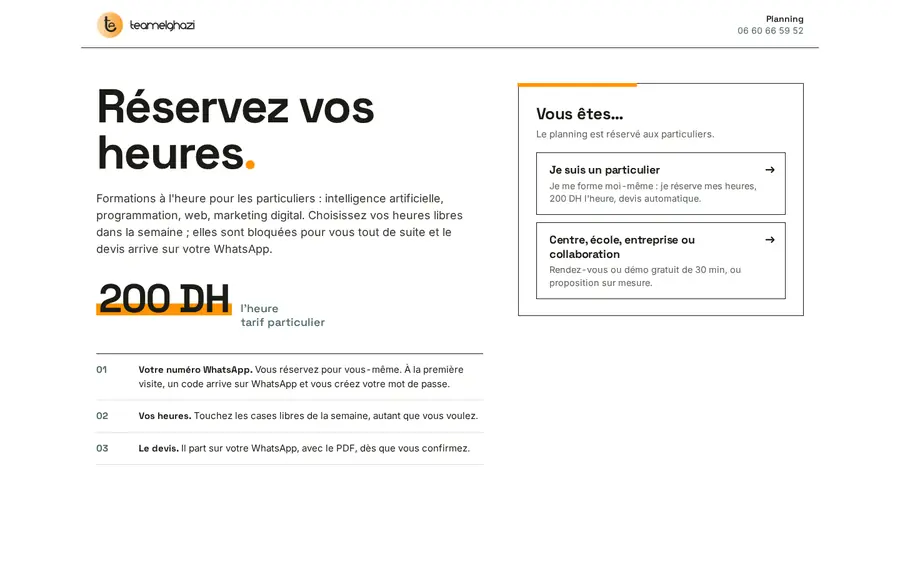
La page de notre planning : les cases libres de la semaine, les heures bloquées tout de suite, le rendez-vous dans Google Agenda.
planning.teamelghazi.com
Réservez vos heuresFormations pour les particuliers : intelligence artificielle, programmation, web, marketing digital.
Devis
sur votre WhatsApp
  • Votre numéro WhatsApp : à la première visite, un code arrive sur WhatsApp
  • Vos heures : touchez les cases libres de la semaine
  • Le devis : il part sur votre WhatsApp, avec le PDF, quand vous confirmez

EnsuiteGoogle Agenda mis à jourRappel la veille

D'après la page réelle, relevée le 20/11/2026 ; ouverte à tous depuis le 08/11/2026.

Le problème

Ñetti xibaar ngir fixer benn waxtu

Fixer benn rendez-vous ci xibaar dafa jël ñetti-ñaari yëgle. Nu jàpp talaata, ki ko laaj day bëggë alxames, alxames bi dafa jël, nu dellusi. Ci biir loolu, benn laaj beree ngi ngoog.

Xalal ab direction des admissions bu ab école : familles yi ubbi sa bopp bi ca guddi, gis waxtu entretien yi amul ci semaine bi, te ñu jël benn. Ca suba, agenda bi équipe bi dafa bees, te kenn bindul bataaxal.

En service

Notre planning,
ouvert à tous.

planning.teamelghazi.com : une heure choisie, bloquée, inscrite dans Google Agenda et confirmée.
Ngir
TeamElGhazi (liggéey bu nu defar ci sunu bopp)
Li ñu def
planning.teamelghazi.com : planning bu jël rendez-vous ci online, bu jokkoo ak Google Agenda, ak numéro réservation yi ak confirmation ci WhatsApp
Kañ
Ubbi ci kepp ci 8 novembar 2026

planning.teamelghazi.com

Jël bu mat, ci tànnaay waxtu bi ba ci jot devis bi, te amul nit ki war a dox ci.

Kliyaa
TeamElGhazi (nu defar ko)
Tàmbali liggéey
Ubbi ñépp 8 novembre 2026
Misaalu liggéey bi
Schéma bi

Une heure choisie, bloquée, confirmée

  1. 01
    Identifié par WhatsAppÀ la première visite, un code arrive sur WhatsApp.
  2. 02
    Les heures libresLa page lit Google Agenda ; ce qui est pris n’apparaît pas.
  3. 03
    Les règles vérifiéesDélai minimum, un seul rendez-vous à venir par personne, case toujours libre.
  4. 04
    Numéro, confirmation, agendaLa case est bloquée, la confirmation part sur WhatsApp, l’événement s’écrit dans l’agenda.
Avant d'ouvrir vos heures

Agenda bi, sayt bi, confirmation bi

Ab sayt web, ab service bu denc réservations yi, Google Agenda, WhatsApp ngir kod ak confirmation, Google Sheets ngir suivi. Ci sunu version bi, service bi bind ci Python te n8n jokkoo ak tableau de suivi bi.

Xam nanu Calendly walla yenn outil bu mel ni mel. Dañuy àndal ci xeet yu bari. Ab planning bu ñu sàrt ci sa bopp dafa jëm ci ni ngeen bëgg sa yoon, sa xibaar ci sa WhatsApp, sa document yi ak sa donnée yi ci yow.

Sa waxtu, jëkk

Sa waxtu, jëkk. Ngeen tëj benn casier, benn bës walla benn àttu ci sa page administration. Li ngeen bind ci Google Agenda, dafa bloque waxtu bi ci sayt bi.

Ci annulation, ngeen tànn ci : mbir dafa jëm ci ab bouton walla ci ab woote ci sa équipe, mooy ki di jël. Loolu ab tànneef ci organisation la, waxul limitation technique.

Li planning bi bayyi amul

Schéma bi jëm liggéey yu bari ci ab outil bu ñu jëfandikoo. Lii la nu gën a xam :

  • Dafa war am hébergement ak kenn bu xool service bi
  • Su lecture Google Agenda sew, sayt bi war a tëj réservation yi, bu ko àndal ci waxtu yu dellu
  • Kod WhatsApp bi di sàmm ci numéro yu fals, waaye dafa jàppal ni ki ngi jëfandikoo WhatsApp
  • Notes yu ndaw yu agenda bi bokkul waxtu bi ñu bloque : dafa war am yoon yu leer ngir xam rendez-vous bu dëgg ak pense-bête
  • Planning bi jot rendez-vous. Waxul conversation bi topp

Ab planning bu mel ni sunu bi, ci yow?

Jëfandikoo sunu bi ci planning.teamelghazi.com : dinga gis parcours bi ci biir. Ngir ab planning ci sa tur, bu jokkoo ak sa agenda ak sa xibaar, laaj devis. Sunu service site de réservation dafa jóge ci schéma bi.

Yeneen modèle yi

Ba réservation bi mat,
rappel bi.

Modèle bu nekk am na bët bu moom, schéma bu moom ak laaj bu installation bu moom.
  • 01

    Yokk benn ligne

    Ñetti buntu, benn tableau, amul dellu bind.

    Jafe-jafe
    Benn tableau bu suivi bu ñu bind ci loxo, dafa jëm ci benn bës
    Lu ko tàmbali
    Benn yónnee ci seen outil yi: formulaire, site walla agent IA
    Njaaram
    Ligne yu yokk ci onglet bi ñu tànn, ak limu ñoom ci tontu bi
  • 02

    Jàng ak bind ab wàll

    Sa site jàng tabular bi. Kenn ubbiwul ko.

    Njuumte
    Tabular bu sa outil yi mën jàng te bind, ci kontrol
    Lu lëjal
    Benn yónnee bu ci sa outil yi: ab tabular, ab wàll, jàng walla bind
    Outil yi
    n8n, API Google Sheets, ab application bu yónni laaj web
  • 03

    Soppali ci ID

    Dosye bu mel ci tablo bi ñetti yoon? Déedéet ba fàww.

    Njariñ
    Tablo bu amul dosye yu mel ni, fu benn dosye bu nekk am xeetu bu bees
    Tàmbalu
    Yonnee bu benn ci sa outil yi, benn ligne benn ak nimeeroom
    Outil yi
    n8n, Google Sheets, benn application bu yonnee benn laaj web
  • 04

    Sàkk onglet

    Ci bés bu njëkk bu weer bi, onglet bu weer bi dafa des na.

    Njariñ
    Ab onglet bu sàkkee ci waxtu bu baax, ci tur bu baax
    Dugal
    Yonnee bu sa outil yu, walla bés (bés bu njëkk bu weer bi)
    Jumtukaay
    n8n, Google Sheets
  • 05

    Journal bu publications

    4 réseaux, benn registre, benn lign ci publication bu nekk.

    Njariñ
    Benn registre bu benn, bu am bés, bu activité ci réseaux sociaux
    Lu tàmbali
    Benn requête web yónnee ci outil bi ba mu def action
    Lu génn
    Benn lign ci benn action, ci 10 kolon
  • 06

    Yónnee guide PDF ci e-mail ak n8n

    Benn guide bu am njariñ, ci benn adresse. Amul dara bu ñu bañ xam, amul dara bu ñu sàkku.

    Jafe
    Guide bu ñu jox te xamuloo ku ko jàng, walla ñu yónni ko ci loxo ba jóg
    Li di tàmbali
    Yónnee formulaire bi ci kaw page bu guide bi
    Li mu jóge
    Benn ligne ci tabal prospects bi ak acces bu gaaw ci PDF bi
Laaj yi ñu bari laaj

Ñaari nit,
benn waxtu ?

5 tontu

Ndax rendez-vous yi ci sama tur di gis ci page bi?

Déwul. Page bi di won rekk ne benn waxtu amul. Ni titre ni détail yu événements ci sa Google Agenda, du feeñ.

Naka lañ ñaari nit ñépp warul jël benn waxtu?

Casier bi ñu bloque ko ci saa si ñu confirmé, laata bataaxal yépp. Nit ki ñaareel gis waxtu bi amul.

Ndax mën nañu laaj fay ci saa si ñu jël rendez-vous?

Sunu planning dafa yónnee devis, te dafa fey dara. Fay ci online mën na dugg ci schéma bi : dafa ci ñeneen.

Ndax mooy baax ci ku nekk ci bopp?

Waaw. Ab coach, ab professeur walla ab consultant am na bëgg bi ab clinique walla ab école am ; schéma bi mooy mel, ak benn agenda rekk.

Ndax mën nañu am agenda yu bari, ngir nit yu bari?

Waaw, ak benn agenda ci nit ku nekk, te am tànneef ci biir. Schéma bi dafa yaatu, waaye njiit bi mooy mel.

Seen laaj

Ba noppi allers-retours ?
Ubbil sa agenda.

ci 100 làkk
01 · Yónnee sa laaj
Sa laaj
Yeen
Benn ci ñaar yi dafa laaj: e-mail walla telefon.
Yónnee

Sa données yi dañuy jëfandikoo rekk ngir tontu yeen (loi 09-08, RGPD). Sutura
02 · Rendez-vous30 min

Sañ-sañ yi, wàll yi, entreprise yi: ngeen di tànn seen créneau ci ligne. Benn premier waxtaan ci 30 minutes ngir benn projet, walla seen waxtu cours.

Tànn benn créneau

03 · Benn appel, benn e-mail06 60 66 59 52

Woolal nu, walla bind ci contact@teamelghazi.com

Service ñu jox ci
  • 100 làkk
Ci Casablanca: ci kanam ci Maroc, ci distance fépp.
Yónnee sa laajRendez-vous