Skip to content
TeamElGhazi
ENChange language
Make a request
Online appointments

Online Appointment Booking Linked to Google Calendar

The tools

No more "are you free on Tuesday?". The person chooses, the calendar fills itself.

In briefTeamElGhazi's online appointment booking template removes the back-and-forth of fixing a meeting: the visitor sees the free slots in Google Calendar, picks one, receives confirmation on WhatsApp, and the appointment is entered in the team's calendar. It suits schools, clinics, practices, customer service teams and independent professionals who see people by appointment.

Google4,8out of 5 · 11 Google reviews

In practice

Problem
Back-and-forth messages to fix every appointment
Trigger
A visitor chooses a free slot on the page
Result
A slot blocked, numbered, confirmed on WhatsApp and added to the calendar
Tools
Web page, Python service, Google Calendar, WhatsApp, Google Sheets, n8n
Online example
planning.teamelghazi.com
Set-up by TeamElGhazi
On quotation
Le planning en ligne

Les cases libres, et l'agenda tenu seul

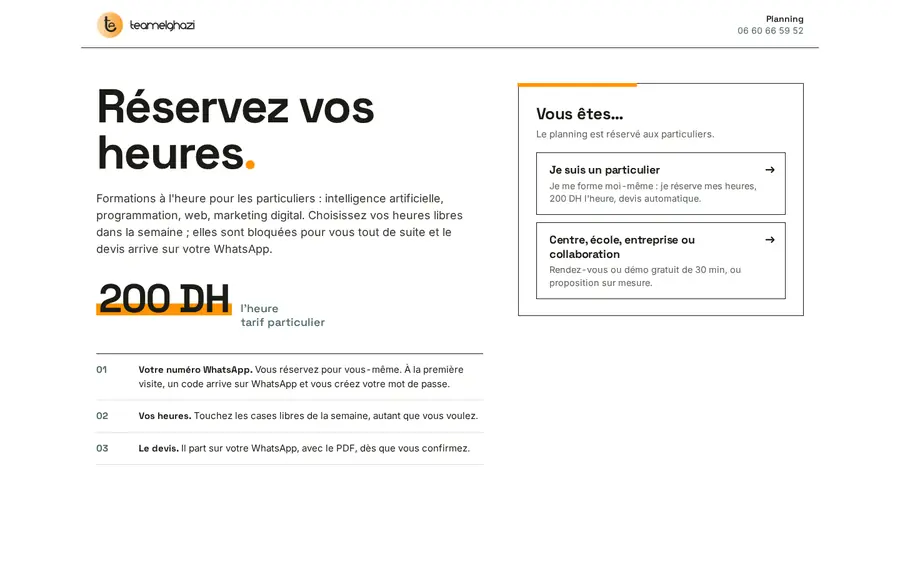
La page de notre planning : les cases libres de la semaine, les heures bloquées tout de suite, le rendez-vous dans Google Agenda.
planning.teamelghazi.com
Réservez vos heuresFormations pour les particuliers : intelligence artificielle, programmation, web, marketing digital.
Devis
sur votre WhatsApp
  • Votre numéro WhatsApp : à la première visite, un code arrive sur WhatsApp
  • Vos heures : touchez les cases libres de la semaine
  • Le devis : il part sur votre WhatsApp, avec le PDF, quand vous confirmez

EnsuiteGoogle Agenda mis à jourRappel la veille

D'après la page réelle, relevée le 20/11/2026 ; ouverte à tous depuis le 08/11/2026.

Le problème

Three messages to fix a time

Fixing an appointment by messages takes several exchanges. You suggest Tuesday, the person prefers Thursday, Thursday is taken, and you start again. Meanwhile, another request is waiting.

Picture the admissions office of a school: families open the page in the evening, see the interview slots still free that week, and book. In the morning, the team's calendar is up to date and nobody has had to write a message.

En service

Notre planning,
ouvert à tous.

planning.teamelghazi.com : une heure choisie, bloquée, inscrite dans Google Agenda et confirmée.
For
TeamElGhazi (in-house project)
What was done
planning.teamelghazi.com: online booking planner linked to Google Calendar, with booking numbers and confirmations by WhatsApp
When
Open to everyone on 8 November 2026

planning.teamelghazi.com: book

A complete booking, from choosing a slot to receiving the quote, without anyone having to step in.

Client
TeamElGhazi (built by us)
Went live
Open to everyone on 8 November 2026
The case study
The diagram

Une heure choisie, bloquée, confirmée

  1. 01
    Identifié par WhatsAppÀ la première visite, un code arrive sur WhatsApp.
  2. 02
    Les heures libresLa page lit Google Agenda ; ce qui est pris n’apparaît pas.
  3. 03
    Les règles vérifiéesDélai minimum, un seul rendez-vous à venir par personne, case toujours libre.
  4. 04
    Numéro, confirmation, agendaLa case est bloquée, la confirmation part sur WhatsApp, l’événement s’écrit dans l’agenda.
Avant d'ouvrir vos heures

The calendar, the page, the confirmation

A web page, a service that keeps the bookings, Google Calendar, WhatsApp for the code and the confirmation, Google Sheets for tracking. In our version, the service is written in Python and n8n links the tracking sheet.

You may know Calendly or a similar tool. They suit many situations. A planner built for you becomes useful when you want your own rules, your messages sent from your own WhatsApp, and your documents and data kept with you.

Your hours, your rules

Your working hours come first. You close a slot, a day or a week from your administration page. Anything you enter in Google Calendar blocks the matching time on the page.

Cancellations come next: you choose whether they go through a button or through a call to your team, who decide. It is an organisational choice, not a technical limit.

What the planner does not replace

This diagram takes more work than a ready-made tool. Here is what you need to know.

  • It needs hosting and someone to keep an eye on the service
  • If reading Google Calendar fails, the page must close bookings rather than display wrong times
  • The WhatsApp code protects against fake numbers, but it assumes that the person uses WhatsApp
  • Small notes in the calendar must not block slots: you need clear rules to tell a real appointment from a reminder
  • The planner takes the appointments. It does not replace the conversation that follows

A planner like ours, for you?

Try ours at planning.teamelghazi.com: you will see the journey from the inside. For a planner in your name, linked to your calendar and to your messages, request a quote. Our booking website service starts from this diagram.

Other templates

Other workflows
ready to plug in.

Each template has its page, its diagram and its installation request.
  • 01

    Add a row

    Three entry points, one sheet, no retyping.

    Problem
    A tracking sheet filled in by hand, always behind
    Trigger
    A submission from one of your tools: form, website or AI agent
    Result
    Rows added to the chosen tab, and their number returned in the response
  • 02

    Read and write a range

    Your website reads the spreadsheet. Nobody opens it.

    Result
    A spreadsheet that your applications can read and edit, under control
    Trigger
    A request from one of your tools: which spreadsheet, which area
    Tools
    n8n, Google Sheets API, any application that sends a web request
  • 03

    Update by ID

    The same case three times in the spreadsheet? Never again.

    Result
    A tracking sheet with no duplicates
    Trigger
    A submission from one of your tools, each row with its number
    Tools
    n8n, Google Sheets, any application that sends a web request
  • 04

    Create a tab

    On the first of the month, the month's tab is already there.

    Result
    A tab created at the right time, with the right name
    Trigger
    A request sent from one of your tools, or a date
    Tools
    n8n, Google Sheets
  • 05

    Posting log

    Four networks, one register, one row per post.

    Result
    A single, dated register of social media activity
    Trigger
    A web request sent by each tool after an action
    Output
    One row per action, in ten columns
  • 06

    PDF guide for an email

    A useful guide in exchange for an address. Nothing more, nothing hidden.

    Problem
    A guide distributed without knowing who reads it
    Trigger
    Submission of the form on the guide page
    Result
    A row in the prospect table and immediate access to the PDF
Frequently asked questions

Your questions
about automation.

5 answers

Are my personal appointments visible on the page?

No. The page only shows that a slot is unavailable. Neither the title nor the details of your Google Calendar events are displayed.

How do you prevent two people from booking the same slot?

The slot is blocked at the moment of confirmation, before any message is sent. The second person sees the slot as unavailable.

Can a payment be requested at booking?

Our planner sends a quote; it does not take payments. An online payment can be added to the diagram: it is priced separately.

Is it suitable for a person working alone?

Yes. A coach, a teacher or a consultant has the same need as a clinic or a school; the diagram stays the same, with a single calendar.

Can there be several calendars, for several people?

Yes, with one calendar per person and a choice at the entry point. The diagram grows longer, but the principle stays the same.

Your request

Your request
comes in here.

in 100 languages
01 · Make a request
Your request
You
At least one of the two: email or phone.
Sending

Your data is used only to reply to you (Law 09-08, GDPR). Privacy
02 · Meeting30 min

Individuals, institutions, companies: you choose your slot online. A first 30-minute conversation for a project, or your lesson hours.

Choose a slot

03 · A call, an e-mail06 60 66 59 52

Call us, or write to contact@teamelghazi.com

Service delivered in
  • 100 languages
From Casablanca: on site in Morocco, remotely everywhere.
Make a requestMeeting