Python · November 12, 2026 · 6 min read
Python: z = 1 > 8, then print(z). True or False?
By Abdellah El Ghazi, Python instructor and founder of TeamElGhazi (Maarif, Casablanca)
Short answer: Python prints False, because 1 is not greater than 8; the comparison 1 > 8 produces a Boolean value, which is stored in z and then printed. If the exercise actually reads z = 8 > 1, the answer is True, so check which way round the code is, especially when the question is written in Arabic.
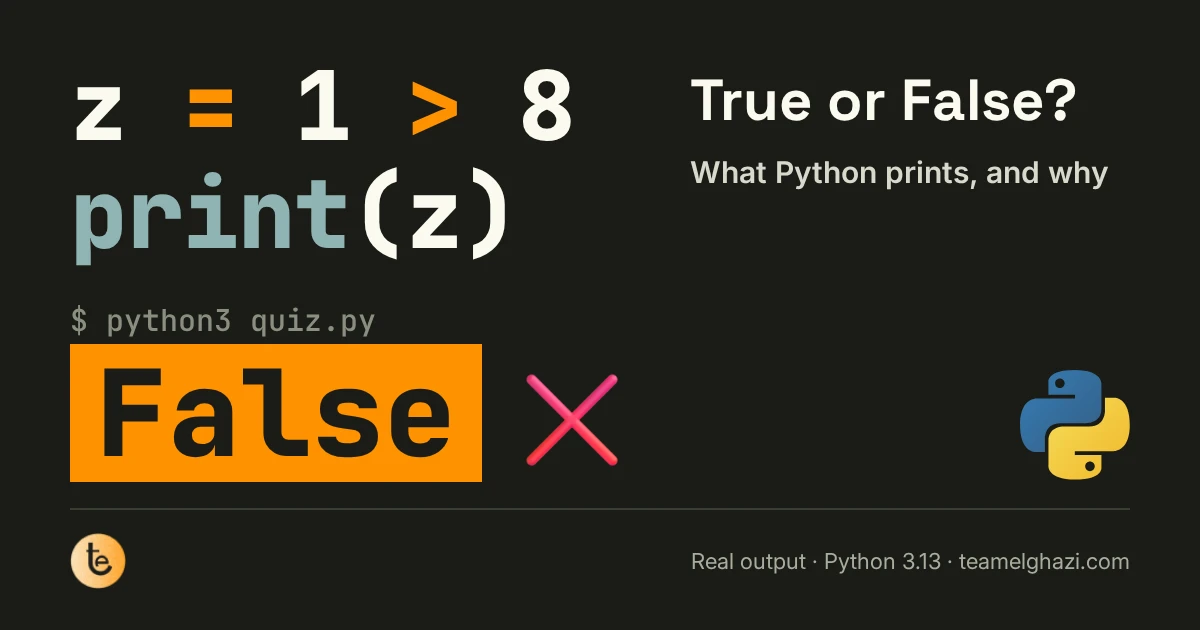
This one turns up in a lot of beginner quizzes: "What does this code print, True or False?" It looks trivial, but it checks three ideas at once: the order in which Python evaluates a line, the Boolean type, and the difference between storing a value and comparing two values. Every output in this article comes from actually running the code on Python 3.13.
What Python does, line by line
z = 1 > 8
print(z)

# Output:
# False- Python evaluates the right-hand side of = first. The expression
1 > 8asks a question: "is 1 strictly greater than 8?" No, so the result isFalse. - It then stores that result in z. The = sign isn't a maths equation here; think of it as an arrow: "put whatever is on the right into z".
- print(z) shows what's inside z, which is
False, with a capital F.
Swap the numbers and everything changes. And type() confirms that z is neither a number nor a string, but a Boolean:
z = 8 > 1
print(z)        # True
print(type(z))  # <class 'bool'>
The 6 comparison operators
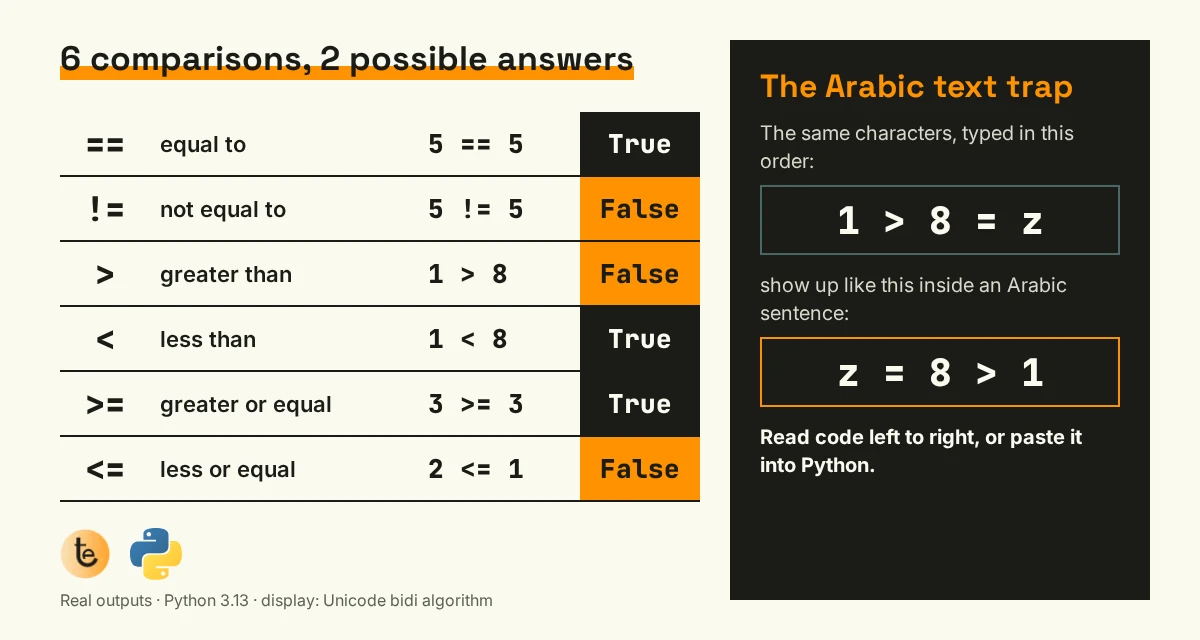
Every comparison has exactly two possible answers: True or False. The pair beginners mix up most is >= and <=: 3 >= 3 is true because "greater than or equal to" allows equality, whereas 3 > 3 is false.
The Arabic-text trap
Plenty of students meet this exercise in Arabic, worded as "ناتج الأمر البرمجي" ("the output of the code"). In right-to-left text, your screen reorders how characters are displayed, following the Unicode bidirectional algorithm. We tested it: characters typed in the order 1 > 8 = z show up as z = 8 > 1 inside an Arabic sentence.
So depending on how the question was copied, you might see 8 > 1 (answer: True) when the real code is 1 > 8 (answer: False), or the other way round. The habit to build: Python code always reads left to right, with the variable before the = sign. If in doubt, paste the line into Python and run it.
= or ==: the most common mistake
One = stores a value; two == compare. A condition therefore needs ==. Here is the real Python 3.13 message when you get it wrong:
x = 5
if x = 5:
    print("ok")

# SyntaxError: invalid syntax.
# Maybe you meant '==' or ':=' instead of '='?
Python practically hands you the fix. Reading error messages all the way to the end is one of the habits we build from the very first session, and it's one of the points in our article on what really holds programming beginners back.
One step further: chaining and combining
grade = 14
print(10 <= grade < 20)           # True
print(1 > 8 and 8 > 1)            # False
print(1 > 8 or 8 > 1)             # True
print(not (1 > 8))                # True
print("10" == 10)                 # False
print(True + True) # 2- Chained comparisons:
10 <= grade < 20reads just like maths, "grade between 10 inclusive and 20 exclusive". - and, or, not combine Booleans:
andneeds everything to be true,orneeds at least one part to be true,notflips the result. - The string "10" isn't the number 10, so the comparison returns
False. A classic trap withinput(), which always returns text. - True counts as 1 and False as 0 in arithmetic, hence
True + True = 2. Handy for counting correct answers.
3 quick exercises
Work out the answer before you open it, and don't run the code first.
age = 17
print(age >= 18)
Answer: False: 17 is not greater than or equal to 18.
print(3 < 8 < 5)
Answer: False: Python reads it as "3 < 8 and 8 < 5", and 8 < 5 is false.
print(bool("False"))
Answer: True: any non-empty string is truthy, even one that spells out the word False.
Learn Python with TeamElGhazi
Comparisons and conditions are part of the first module of our Python Fundamentals course ("Variables & Operators", then "Loops & Conditions"): 1.5 months, live online, 1,000 MAD, ending with an automation project. Based in Casablanca? Our Python course in Casablanca page explains how it runs.
Not sure where to start? Read how to learn Python in Morocco, and if it's for your child, the best age to start coding.
Frequently asked questions
What does print(1 > 8) output in Python?
False. The > operator asks "is 1 greater than 8?". It isn't, so Python returns the Boolean value False. Flip it around and print(8 > 1) prints True.
What's the difference between = and == in Python?
A single = stores a value in a variable (x = 5). A double == compares two values and returns True or False (x == 5). Writing if x = 5: is a syntax error, and Python 3.13 even suggests the fix: "Maybe you meant '=='".
Why are True and False capitalised?
They are the only two values of the bool type, and that's how Python spells them. Lowercase true or false isn't recognised: Python raises a NameError.
Where can I learn Python basics online in French or Arabic?
TeamElGhazi's Python Fundamentals course runs live online for 1.5 months and costs 1,000 MAD: variables and operators, loops and conditions, functions, files, then an automation project. Sessions are taught from Casablanca, Morocco.
All our courses and prices are on the courses page; more answers in our FAQ.
Want solid Python basics without memorising rules? The first module starts right here.
See the Python course